Invoice Fly is a popular invoicing app for contractors and service businesses. It bundles estimates, card payments and expense tracking into one subscription. InvoiceNexora takes the opposite approach: a focused, offline-first invoice app that is free for unlimited invoices. If you are choosing between the two, the right answer depends on whether you need the extras Invoice Fly charges for. (Comparing other apps too? See our InvoiceNexora vs Invoice Simple and InvoiceNexora vs Zoho Invoice breakdowns.)
Quick Comparison at a Glance
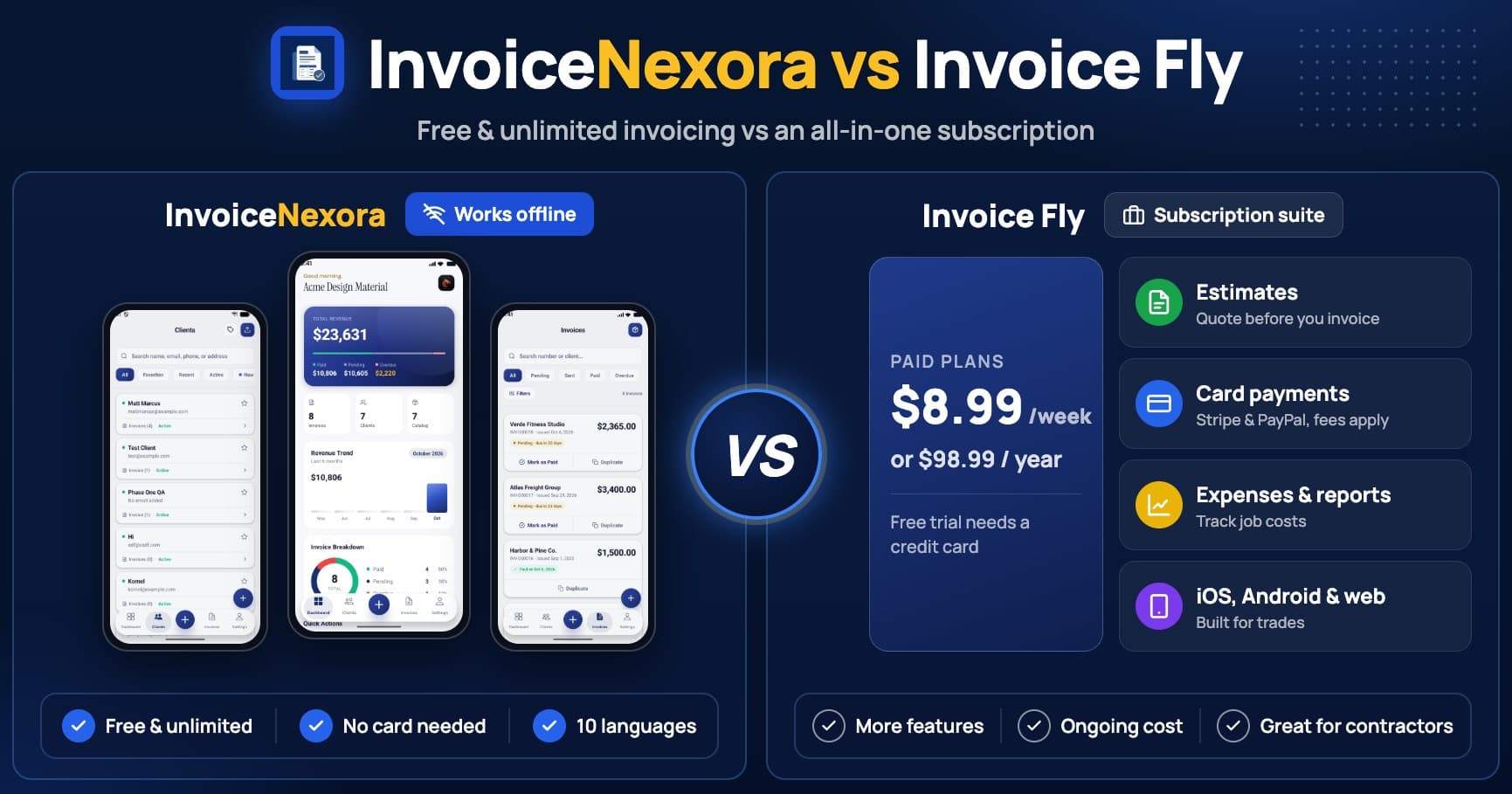
- Price: Invoice Fly costs $8.99/week or $98.99/year. InvoiceNexora is free; the optional Pro plan costs $9.99/month or $89.99/year.
- Free use: Invoice Fly offers a free trial that requires a credit card. InvoiceNexora's Free plan needs no card and has no invoice or client limit.
- Payments: Invoice Fly accepts cards and online payments through Stripe and PayPal. InvoiceNexora doesn't process payments; you add your bank, Wise or PayPal details to the invoice.
- Estimates and expenses: Invoice Fly includes estimates, an expense tracker and reports. InvoiceNexora focuses on invoices only.
- Offline: InvoiceNexora creates invoices and PDFs with no connection after the first sign-in. Invoice Fly doesn't advertise an offline mode.
- Languages: InvoiceNexora issues invoices in 10 languages, including right-to-left Arabic and Urdu, chosen per invoice.
- Platforms: Invoice Fly runs on iOS, Android and the web. InvoiceNexora is on Android, with iOS coming.
Pricing: What Each App Really Costs per Year
Invoice Fly's pricing page lists two plans with the same features: a Weekly plan at $8.99 and a Yearly plan at $98.99. The weekly plan looks small, but over a year it adds up to about $467. Either way, you need a paid plan to keep using the app after the trial. Invoice Fly notes that when a subscription lapses, the account is deactivated: you can still see your lists, but you can't open or edit individual documents until you pay again.
InvoiceNexora's Free plan doesn't expire. It includes unlimited invoices and clients, 7 templates, PDF sharing and manual data export, so your invoices are never held behind a payment. Pro ($9.99/month or $89.99/year) adds cloud backup, multi-device sync, all 16 templates and an ad-free app. You can stay on Free indefinitely.
Where Invoice Fly Wins
Invoice Fly is a strong product, and for some businesses the subscription pays for itself:
- Estimates to invoices: If you quote every job before you start, Invoice Fly's unlimited estimates save you a separate tool.
- Card and online payments: Clients can pay by card through Stripe or PayPal. Processor fees apply, but getting paid on the spot speeds up cash flow for trades.
- Expense tracking and reports: Logging job costs next to your invoices gives a rough picture of profit without separate bookkeeping software.
- iPhone and web access: If you work on an iPhone or prefer a desktop browser, Invoice Fly is available there today.
Where InvoiceNexora Wins
- Free without a trial clock: No credit card, no hold on your card, and no invoice cap. You can bill your first client today and your hundredth next year at the same price: zero.
- Works with no signal: Create invoices, add clients and generate PDFs in a basement, on a plane or on a rural job site. You only need a connection once, to sign in. More in our guide to the best offline invoice apps.
- Invoices in your client's language: Pick English, Spanish, French, German, Italian, Portuguese, Russian, Arabic, Hindi or Urdu for each invoice, independent of the app's own language. See how to invoice international clients.
- Multi-currency billing: Set a currency per invoice and keep a product and service catalog with prices in more than one currency.
- No processing fees: Because the app doesn't sit between you and your client's money, you keep 100% of what you're paid by bank transfer, Wise or PayPal. Here's why an invoice app without payment processing can be the better choice.
Which Should You Choose?
- Choose Invoice Fly if: You run a trade or field-service business, quote every job, want clients to pay by card from the invoice, and work on an iPhone.
- Choose InvoiceNexora if: You are a freelancer, consultant or solo service provider who mostly sends invoices and gets paid by transfer, bills international clients, works with patchy internet, or doesn't want another subscription.
How to Switch from Invoice Fly to InvoiceNexora
- 01Before your Invoice Fly subscription ends, download PDFs of the invoices you need to keep and copy your client list.
- 02Install InvoiceNexora from Google Play and set up your business profile with your logo, signature and default currency.
- 03Add your clients: import them from a CSV file, pick them from your phone's contacts, or add them as you bill.
- 04Set your invoice prefix and next number so your numbering continues where Invoice Fly left off.
- 05Add your payment details (bank, Wise or PayPal) to your invoice notes so clients know how to pay.
Download the app
Send branded, professional invoices in under a minute.
Mobile-first invoicing for freelancers and small businesses. Templates, clients, multi-currency, and clear payment tracking - all from your phone. This article is only the plan. The app is the shortcut.