A GST tax invoice in India must show your name, address and GSTIN; a serial number unique for the financial year; the date; your customer's name, address and GSTIN (if registered); the HSN or SAC code, description and quantity of each item; the taxable value; the rate and amount of CGST and SGST, or IGST; the place of supply for inter-state sales; whether tax is payable on reverse charge; and your signature. Those details come from Rule 46 of the CGST Rules. This guide turns them into a checklist, with a worked example and the steps to make a GST bill on your phone.
Who issues a GST tax invoice
Only GST-registered businesses issue tax invoices and charge GST. Registration is generally required once your turnover crosses ₹40 lakh for goods or ₹20 lakh for services (₹20 lakh and ₹10 lakh in special category states), and for some businesses, such as inter-state suppliers of goods, at any turnover.
If you aren't registered, you can't charge GST: send a plain invoice with no GST and no GSTIN. Composition dealers and businesses selling only exempt items issue a bill of supply instead of a tax invoice, also without GST; a composition dealer must write "composition taxable person, not eligible to collect tax on supplies" at the top.
The Rule 46 checklist
- 01Your name, address and GSTIN.
- 02A consecutive serial number of up to 16 characters (letters, numbers, "-" and "/"), unique for the financial year.
- 03The date of issue.
- 04Your customer's name, address and GSTIN (or UIN) if they are registered.
- 05For an unregistered customer: name, address, delivery address and the state name and code when the value is ₹50,000 or more (or when they ask for it).
- 06The HSN code for goods or SAC code for services.
- 07A description of the goods or services.
- 08The quantity and unit, for goods.
- 09The total value and the taxable value after any discount.
- 10The rate and amount of each tax: CGST and SGST (or UTGST), or IGST, and cess if any.
- 11For inter-state supplies, the place of supply with the state name.
- 12The delivery address, if it's different from the place of supply.
- 13Whether tax is payable on reverse charge.
- 14Your signature or digital signature (not needed on an e-invoice under the IT Act).
Rule 46 doesn't require the words "Tax Invoice", but it's the standard title and makes the document clearly different from a bill of supply.
HSN and SAC codes: how many digits
Under Notification 78/2020-Central Tax, businesses with turnover up to ₹5 crore in the previous year show a 4-digit HSN/SAC code (optional on invoices to unregistered customers), and businesses above ₹5 crore show 6 digits. Goods use HSN codes; services use SAC codes, which start with 99.
CGST + SGST or IGST?
- Within the same state (intra-state): split the rate into CGST and SGST. At 18% that's 9% CGST + 9% SGST. In a union territory without a legislature, UTGST replaces SGST.
- Between states (inter-state): charge the full rate as IGST, and write the place of supply with the state name, for example "Place of supply: Karnataka (29)".
- Since 22 September 2025 most goods and services fall into the 5% or 18% slabs, with 40% for a short list of luxury and sin goods; the old 12% and 28% slabs were largely removed. Check the rate for your HSN/SAC code.
Example: a web developer in Pune billing a client in Bengaluru
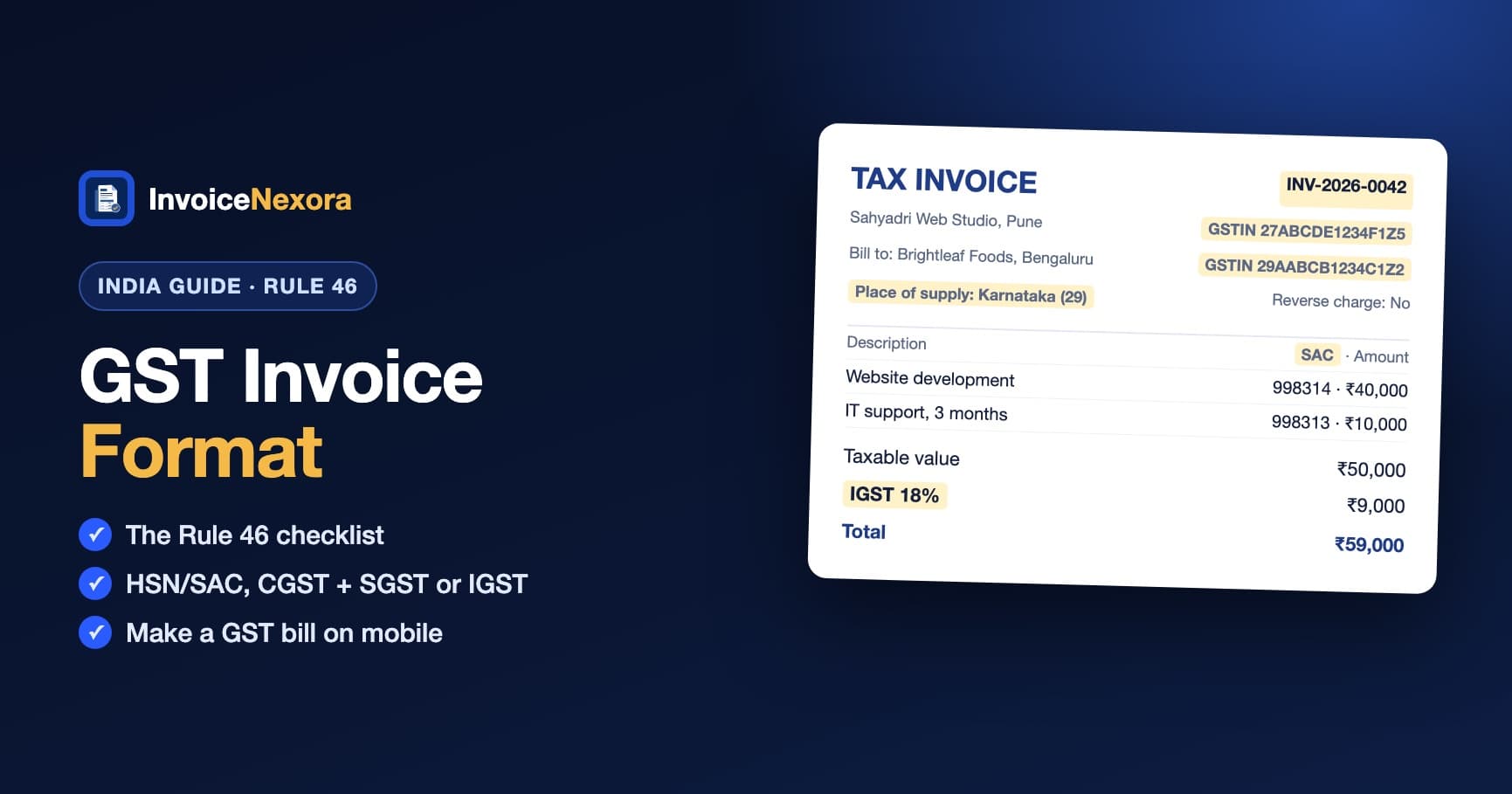
- Tax invoice INV-2026-0042 · Date: 3 November 2026
- From: Sahyadri Web Studio · Pune, Maharashtra · GSTIN 27ABCDE1234F1Z5 (example)
- To: Brightleaf Foods Pvt Ltd · Bengaluru, Karnataka · GSTIN 29AABCB1234C1Z2 (example)
- Place of supply: Karnataka (29) · Tax payable on reverse charge: No
- Website development · SAC 998314 · 1 × ₹40,000
- IT support, 3 months · SAC 998313 · 1 × ₹10,000
- Taxable value: ₹50,000
- IGST (18%): ₹9,000
- Total: ₹59,000
- Signature of the authorised signatory
If the same client were in Mumbai (also Maharashtra), the tax lines would be CGST (9%) ₹4,500 and SGST (9%) ₹4,500, with the same ₹59,000 total.
Timing, copies and records
- Goods: issue the invoice before or at the time of removal or delivery. Services: within 30 days of the supply.
- Goods invoices are made in triplicate (original for the buyer, duplicate for the transporter, triplicate for you); services in duplicate.
- Under ₹200 to an unregistered customer who doesn't ask for an invoice, you can skip it and issue one consolidated tax invoice at the end of the day.
- Keep invoices and GST records for 72 months from the due date of the annual return for that year.
E-invoicing (IRN) above ₹5 crore
If your aggregate turnover in any year since 2017-18 was over ₹5 crore, your B2B invoices and exports must be e-invoices: reported to the Invoice Registration Portal, which returns an Invoice Reference Number (IRN) and a QR code to print on the invoice. Below that threshold, a regular PDF tax invoice is fine.
Common mistakes
- Charging IGST on a same-state sale, or CGST + SGST on an inter-state one.
- Leaving out the place of supply on an inter-state invoice.
- Missing HSN/SAC codes, or the customer's GSTIN on a B2B invoice (they can't claim input tax credit without it).
- Restarting or repeating invoice numbers within the same financial year.
- Charging GST while unregistered, or as a composition dealer.
How to make a GST bill on mobile with InvoiceNexora
- 01In Settings → Business Profile, add your business address. In Settings → Defaults, enter your GSTIN as the Tax Registration Number, turn on the "Tax invoice" title, and add your signature.
- 02Add your client with their address (including the state) and their GSTIN in the Tax number field. It prints under their address.
- 03Pick the CGST + SGST preset for a same-state client, or IGST for another state. Both start at 18%; change the rate if your item is in the 5% slab.
- 04Add each item with its HSN/SAC code in the description, for example "SAC 998314", plus quantity and price.
- 05In the invoice notes, add "Place of supply: Karnataka (29)" for inter-state sales and "Tax payable on reverse charge: No". Then share the PDF on WhatsApp or by email. Everything works offline.
The free plan includes unlimited invoices and clients with no watermark, in English, Hindi and 8 other languages. Get the free invoice maker, and see how to send an invoice on WhatsApp.
Download the app
Send branded, professional invoices in under a minute.
Mobile-first invoicing for freelancers and small businesses. Templates, clients, multi-currency, and clear payment tracking - all from your phone. This article is only the plan. The app is the shortcut.