An Australian tax invoice must show that it is a tax invoice, the seller's identity and ABN, the date it was issued, a brief description of what was sold with the quantity and price, the GST amount (or "Total price includes GST") and how much of each sale is taxable. For sales of $1,000 or more it must also show the buyer's identity or ABN. Those are the rules on the ATO's tax invoices page. This guide explains each one, shows a worked example, and covers what to do if you're not registered for GST.
Who issues tax invoices
You must register for GST when your GST turnover is $75,000 or more ($150,000 for non-profits), when you expect to reach that in your first year, or if you drive taxi or ride-share passengers, whatever your turnover. Below the threshold, registering is optional. GST is 10% on taxable sales.
If you are not registered for GST, you can't charge GST or issue a tax invoice. Send a regular invoice titled "Invoice", with no GST line. You should still include your ABN: when a supplier doesn't quote an ABN, the business paying them generally has to withhold 47% of the payment unless an exception applies.
The 7 details for sales under $1,000
- 01That the document is intended to be a tax invoice (the words "Tax invoice" do this).
- 02The seller's identity: your name or business name.
- 03The seller's Australian business number (ABN).
- 04The date the invoice was issued.
- 05A brief description of each item sold, with the quantity (if applicable) and the price.
- 06The GST amount payable, shown separately, or the statement "Total price includes GST" when the GST is exactly one-eleventh of the total.
- 07The extent to which each sale on the invoice is taxable.
Sales of $1,000 or more
From $1,000, the tax invoice must also show the buyer's identity or ABN. An invoice that meets the $1,000 rules is valid for smaller sales too, so it's simplest to always include your customer's name.
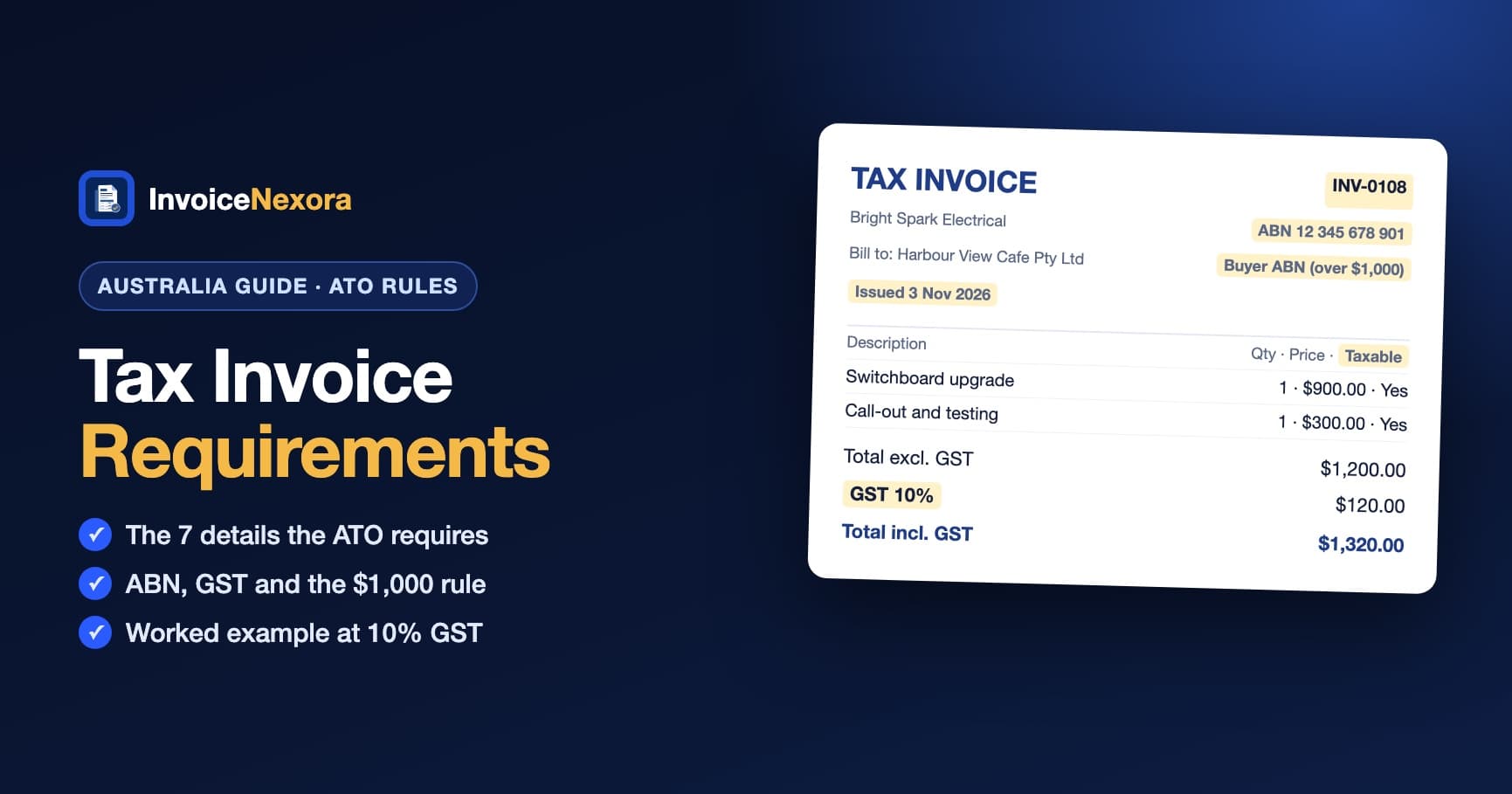
Example: a tax invoice from an electrician
- Tax invoice INV-0108 · Issued 3 November 2026
- From: Bright Spark Electrical · ABN 12 345 678 901 (example)
- To: Harbour View Cafe Pty Ltd · ABN 98 765 432 109 (example; required because the total is over $1,000)
- Switchboard upgrade · 1 × $900.00 · taxable
- Call-out and testing · 1 × $300.00 · taxable
- Total excluding GST: $1,200.00
- GST (10%): $120.00
- Total including GST: $1,320.00
Taxable and GST-free items on one invoice
If one invoice mixes taxable items with GST-free or input-taxed items, it must make clear which items are taxable, and show the GST amount and the total to pay. When the GST isn't exactly one-eleventh of the total, "Total price includes GST" isn't enough: show the GST amount.
Common mistakes
- Calling it a tax invoice, or charging GST, when you aren't registered for GST.
- Leaving off your ABN, which can mean your client withholds 47% of the payment.
- Leaving off the buyer's name or ABN on sales of $1,000 or more.
- Not making clear which items are taxable on a mixed invoice.
- Missing the 28-day deadline when a customer asks for a tax invoice.
Rounding, eInvoicing and records
Round GST to the nearest cent, with half a cent rounding up. Australia also uses the Peppol network for eInvoicing between business software, but a PDF tax invoice remains valid. Keep your tax invoices and business records, generally for 5 years.
How to make a tax invoice in InvoiceNexora
- 01In Settings → Defaults, enter your ABN as the Tax Registration Number (it prints under the GST line as "GST No.") and turn on the "Tax invoice" title. Invoices that charge GST are then titled "Tax invoice".
- 02Pick the Australia GST 10% rate from the tax presets. The tax line is labelled GST.
- 03Add your client with their name, and their ABN in the Tax number field if they gave you one (required from $1,000). It prints under their details.
- 04Add each item with quantity and price. Invoice numbers are sequential automatically.
- 05Preview the PDF and share it by email or WhatsApp. Everything works offline.
The free plan includes unlimited invoices and clients with no watermark. Get the free invoice maker and send your next tax invoice from the job site in under a minute. Billing clients overseas? See our multi-currency invoicing guide.
Download the app
Send branded, professional invoices in under a minute.
Mobile-first invoicing for freelancers and small businesses. Templates, clients, multi-currency, and clear payment tracking - all from your phone. This article is only the plan. The app is the shortcut.