A UAE tax invoice must say "Tax Invoice", show your name, address and TRN, your customer's name, address and TRN (if registered), a sequential number, the date, and for each item the description, quantity, unit price, VAT rate and amount in AED, plus the total VAT in AED. It must be issued within 14 days of the supply. Saudi Arabia has similar content rules, but since December 2021 every VAT-registered business there must issue invoices through a ZATCA-compliant e-invoicing system. This guide covers both.
UAE: who issues tax invoices
You must register for VAT with the Federal Tax Authority (FTA) when your taxable supplies over the last 12 months exceed AED 375,000, and you can register voluntarily from AED 187,500. The standard rate is 5%. Only registered businesses charge VAT and issue tax invoices; if you aren't registered, send a regular invoice with no VAT and no TRN.
UAE: what a full tax invoice must show
- 01The words "Tax Invoice", clearly displayed.
- 02Your name, address and Tax Registration Number (TRN).
- 03Your customer's name and address, and their TRN if they are registered.
- 04A sequential tax invoice number.
- 05The date of issue, and the date of supply if it's different.
- 06A description of the goods or services.
- 07For each item: unit price, quantity, VAT rate and amount payable in AED.
- 08Any discount offered.
- 09The gross amount payable in AED.
- 10The VAT amount payable in AED, with the rate.
- 11For reverse-charge supplies, a statement that the customer must account for the VAT.
These come from Article 59 of the VAT Executive Regulation; the FTA explains them in its tax invoices guide. You may invoice in another currency, but the VAT amount must also be shown in AED.
UAE: simplified tax invoice
If your customer isn't VAT-registered, or is registered and the total is AED 10,000 or less, a simplified tax invoice is enough. It needs the words "Tax Invoice", your name, address and TRN, the date, a description, and the total including VAT with the VAT amount. Your customer's details and per-item breakdown can be left out.
Example: a Dubai design studio
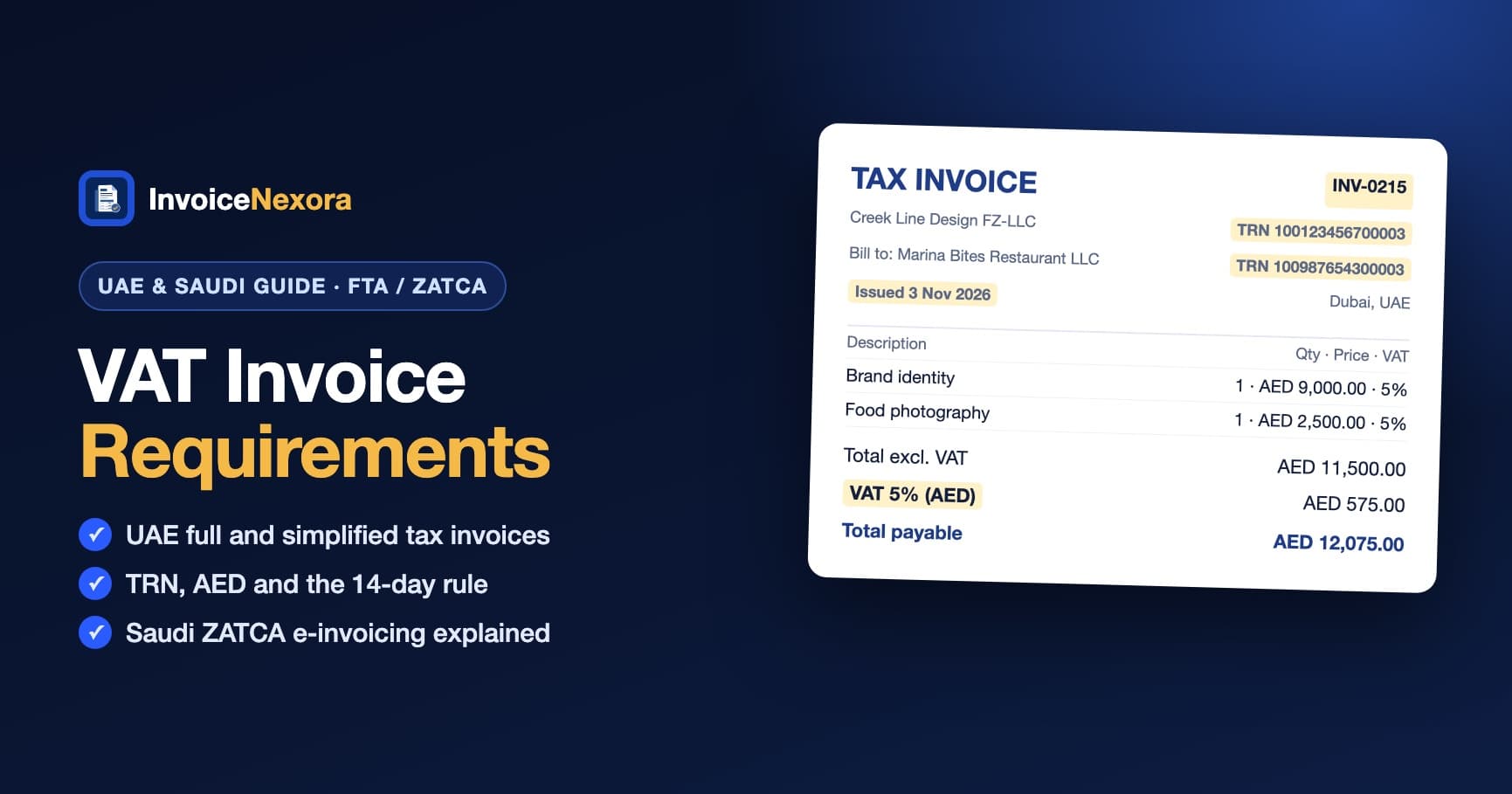
- Tax Invoice INV-0215 · Date of issue: 3 November 2026
- From: Creek Line Design FZ-LLC · Dubai · TRN 100123456700003 (example)
- To: Marina Bites Restaurant LLC · Dubai · TRN 100987654300003 (example)
- Brand identity · 1 × AED 9,000.00 · VAT 5%
- Food photography · 1 × AED 2,500.00 · VAT 5%
- Total excluding VAT: AED 11,500.00
- VAT (5%): AED 575.00
- Total payable: AED 12,075.00
Because the customer is registered and the total is over AED 10,000, this must be a full tax invoice with both TRNs.
UAE e-invoicing from 2027
Under Ministerial Decision No. 243 of 2025, B2B and B2G invoices move to a structured e-invoicing system through accredited service providers: from 1 January 2027 for businesses with revenue of AED 50 million or more, and from 1 July 2027 for everyone else. B2C invoices are outside the scheme. Until your date, a PDF tax invoice with the details above remains valid.
Saudi Arabia: ZATCA e-invoicing
In Saudi Arabia, VAT is 15%. You must register with ZATCA when taxable supplies exceed SAR 375,000 in 12 months (voluntary from SAR 187,500). Registered businesses issue a tax invoice to other businesses and a simplified tax invoice to consumers, in Arabic. A simplified invoice shows the date, your name and address, a description, the total including VAT and the VAT amount; under SAR 1,000 your VAT number can be left off.
The bigger rule is e-invoicing (Fatoora). Since 4 December 2021, every VAT-registered business must generate and store invoices through an electronic solution that meets ZATCA's requirements, including a QR code on simplified invoices. A scanned or typed-up paper invoice doesn't count. In the second phase, rolled out in waves since 2023, that solution must also connect to ZATCA's systems.
Common mistakes
- Leaving off the words "Tax Invoice" (required in both countries).
- Missing your customer's TRN on a UAE invoice to a registered business.
- Showing VAT only in US dollars or euros on a UAE invoice: the VAT must also be in AED.
- Issuing a UAE tax invoice more than 14 days after the supply.
- Using a non-compliant tool for VAT invoices in Saudi Arabia.
How to make a UAE tax invoice in InvoiceNexora
- 01In Settings → Business Profile, add your business address. In Settings → Defaults, enter your TRN as the Tax Registration Number and turn on the "Tax invoice" title.
- 02Add your client with their address, and their TRN in the Tax number field. It prints under their address.
- 03Pick the UAE VAT 5% preset and set the currency to AED.
- 04Add each item with a description, quantity and price. Invoice numbers are sequential automatically.
- 05Preview the PDF, in English or Arabic, and share it by WhatsApp or email within 14 days of the supply. Everything works offline.
The free plan includes unlimited invoices and clients with no watermark, with real right-to-left Arabic invoices. Get the free invoice maker, and see our guide on how to write an invoice in Arabic.
Download the app
Send branded, professional invoices in under a minute.
Mobile-first invoicing for freelancers and small businesses. Templates, clients, multi-currency, and clear payment tracking - all from your phone. This article is only the plan. The app is the shortcut.